





Thank you! Your submission has been received!
Oops! Something went wrong while submitting the form.




Businesses constantly seek efficient tools to process, model, and analyze their data. Microsoft Fabric, with its unified platform for data storage, processing, and analytics, has become the go-to solution. dbt (Data Build Tool), as a robust data transformation tool used extensively in data engineering processes, is one such tool that boosts Microsoft Fabric's potential.
Combining dbt and Microsoft Fabric has a lot to offer in terms of simplifying your data transformations, automating processes, and facilitating self-service analytics. In this blog, we will walk you through integrating dbt with Microsoft Fabric so you can take full advantage of its capabilities for modeling and analytics.
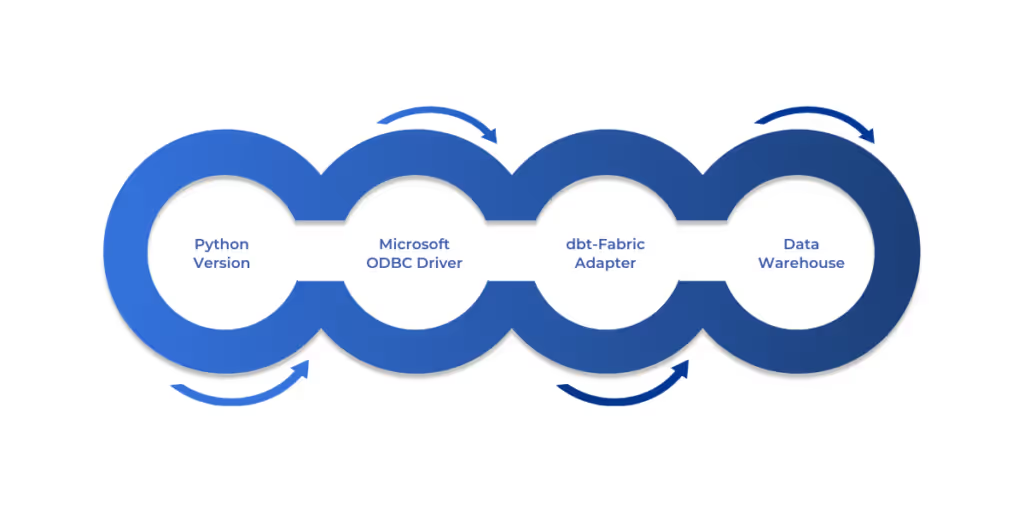
Before diving into setting up dbt with Microsoft Fabric, there are a few prerequisites you need to ensure are in place. These prerequisites are essential for smooth integration and operation of dbt with the platform.
Once you have those prerequisites in place, you are ready to set up dbt with Microsoft Fabric. Now let's move on to the next step.
Visit Microsoft’s official documentation for more information.
Now that the foundation has been laid out, let's take a look at setting up dbt with Microsoft Fabric. This consists of several key areas for integration and configuration.
With dbt in place, it's now time to integrate dbt with Apache Airflow for orchestration.

A key part of using dbt in production environments is orchestrating and automating the workflow. This is where Apache Airflow comes in, helping you automate the running of dbt tasks and manage dependencies across your data pipeline.
With dbt running smoothly within your data pipeline and integrated with Airflow, the next step is to follow best practices for managing dbt projects in Microsoft Fabric.
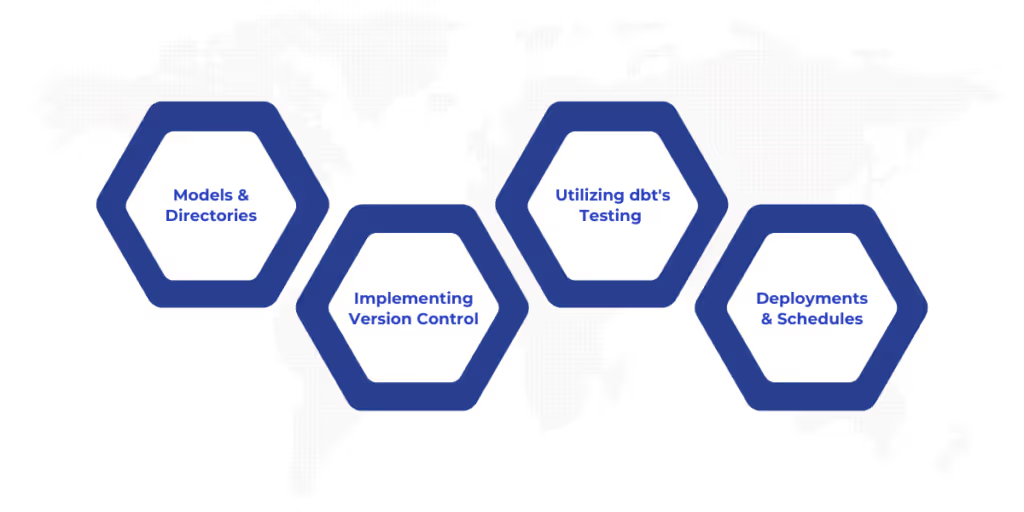
When using dbt with Microsoft Fabric, it’s essential to follow best practices to ensure efficient workflows, maintainability, and collaboration within your teams. Here are some key strategies for optimal dbt usage:
Also Read: Implementing Data Fabric for Hybrid Cloud
With these best practices in mind, let's move forward and explore how to troubleshoot common issues that may arise during dbt setup and use.

Although dbt is highly capable, you can still find some problems along the way. Here are some common problems and feasible solutions to keep your setup intact:
With troubleshooting behind us, let’s discuss best practices for schema management in dbt to make sure you get the most out of your setup.
Integrating dbt with Microsoft Fabric is a powerful combination that can significantly enhance your data transformation processes. From easy setup to seamless integration with Power BI and Apache Airflow, dbt makes it easier to manage and analyze data efficiently.
However, implementing dbt in your organization is just the beginning. To maximize its potential, follow best practices, troubleshoot issues as they arise, and continually optimize your workflows.
At WaferWire, our Microsoft and AI specialists can assist you throughout each process of implementing dbt with Microsoft Fabric, from installation to high-level customization. Whether you require assistance in setting up your environment, streamlining your workflows, or integrating Power BI, we're here to support you. Contact WaferWire today to elevate your data transformation procedures to the next level.
Q1. Why integrate dbt with Microsoft Fabric for data transformations?
dbt lets you use SQL to transform raw data into analytics-ready models, streamlining your pipeline within Fabric’s data warehouse. This ensures clean, reliable data for reports, like summarizing sales for business insights.
Q2. What components do you need to use dbt with Fabric?
You need Python 3.7+, the Microsoft ODBC Driver for SQL Server, the dbt-fabric adapter, and a Fabric Data Warehouse. These ensure dbt connects seamlessly to transform data in your Fabric environment.
Q3. How does Airflow automation benefit dbt in Fabric?
Airflow automates dbt tasks via DAGs, scheduling dbt run and dbt test jobs. For example, you can automate daily updates to a customer model, with Fabric’s Airflow UI tracking execution for reliability.
Q4. How can you resolve dbt connectivity issues in Fabric?
Check profiles.yml for correct server and authentication details. Verify the ODBC driver installation. Run dbt debug to test connectivity, and ensure Azure AD credentials are valid to fix login errors.
Q5. What’s the value of dbt’s testing in Fabric projects?
dbt’s tests ensure data quality by checking for nulls or duplicates. For example, testing a sales table for missing IDs prevents errors in Fabric reports, keeping your analytics accurate and trustworthy.



Businesses constantly seek efficient tools to process, model, and analyze their data. Microsoft Fabric, with its unified platform for data storage, processing, and analytics, has become the go-to solution. dbt (Data Build Tool), as a robust data transformation tool used extensively in data engineering processes, is one such tool that boosts Microsoft Fabric's potential.
Combining dbt and Microsoft Fabric has a lot to offer in terms of simplifying your data transformations, automating processes, and facilitating self-service analytics. In this blog, we will walk you through integrating dbt with Microsoft Fabric so you can take full advantage of its capabilities for modeling and analytics.
Before diving into setting up dbt with Microsoft Fabric, there are a few prerequisites you need to ensure are in place. These prerequisites are essential for smooth integration and operation of dbt with the platform.
Once you have those prerequisites in place, you are ready to set up dbt with Microsoft Fabric. Now let's move on to the next step.
Visit Microsoft’s official documentation for more information.
Now that the foundation has been laid out, let's take a look at setting up dbt with Microsoft Fabric. This consists of several key areas for integration and configuration.
With dbt in place, it's now time to integrate dbt with Apache Airflow for orchestration.
A key part of using dbt in production environments is orchestrating and automating the workflow. This is where Apache Airflow comes in, helping you automate the running of dbt tasks and manage dependencies across your data pipeline.
With dbt running smoothly within your data pipeline and integrated with Airflow, the next step is to follow best practices for managing dbt projects in Microsoft Fabric.
When using dbt with Microsoft Fabric, it’s essential to follow best practices to ensure efficient workflows, maintainability, and collaboration within your teams. Here are some key strategies for optimal dbt usage:
Also Read: Implementing Data Fabric for Hybrid Cloud
With these best practices in mind, let's move forward and explore how to troubleshoot common issues that may arise during dbt setup and use.
Although dbt is highly capable, you can still find some problems along the way. Here are some common problems and feasible solutions to keep your setup intact:
With troubleshooting behind us, let’s discuss best practices for schema management in dbt to make sure you get the most out of your setup.
Integrating dbt with Microsoft Fabric is a powerful combination that can significantly enhance your data transformation processes. From easy setup to seamless integration with Power BI and Apache Airflow, dbt makes it easier to manage and analyze data efficiently.
However, implementing dbt in your organization is just the beginning. To maximize its potential, follow best practices, troubleshoot issues as they arise, and continually optimize your workflows.
At WaferWire, our Microsoft and AI specialists can assist you throughout each process of implementing dbt with Microsoft Fabric, from installation to high-level customization. Whether you require assistance in setting up your environment, streamlining your workflows, or integrating Power BI, we're here to support you. Contact WaferWire today to elevate your data transformation procedures to the next level.
Q1. Why integrate dbt with Microsoft Fabric for data transformations?
dbt lets you use SQL to transform raw data into analytics-ready models, streamlining your pipeline within Fabric’s data warehouse. This ensures clean, reliable data for reports, like summarizing sales for business insights.
Q2. What components do you need to use dbt with Fabric?
You need Python 3.7+, the Microsoft ODBC Driver for SQL Server, the dbt-fabric adapter, and a Fabric Data Warehouse. These ensure dbt connects seamlessly to transform data in your Fabric environment.
Q3. How does Airflow automation benefit dbt in Fabric?
Airflow automates dbt tasks via DAGs, scheduling dbt run and dbt test jobs. For example, you can automate daily updates to a customer model, with Fabric’s Airflow UI tracking execution for reliability.
Q4. How can you resolve dbt connectivity issues in Fabric?
Check profiles.yml for correct server and authentication details. Verify the ODBC driver installation. Run dbt debug to test connectivity, and ensure Azure AD credentials are valid to fix login errors.
Q5. What’s the value of dbt’s testing in Fabric projects?
dbt’s tests ensure data quality by checking for nulls or duplicates. For example, testing a sales table for missing IDs prevents errors in Fabric reports, keeping your analytics accurate and trustworthy.







.svg)
