



Thank you! Your submission has been received!
Oops! Something went wrong while submitting the form.



Modern transformation demands data platforms that can scale and innovate as fast as the business. Unfortunately, many enterprises are still reliant on aging SQL Server deployments that require constant patching, manual upgrades, and costly server refresh cycles, making it harder to deliver new digital capabilities with speed and confidence.
Migrating SQL Server to Azure SQL Managed Instance changes that equation. With managed availability, optimized performance, lower total cost of ownership, and automated operations, organizations free their teams to focus on modernization, not maintenance.
This guide simplifies the key modernization challenges and explores how Azure SQL MI unlocks modernization outcomes with reduced risk, improved performance, and measurable cost savings.
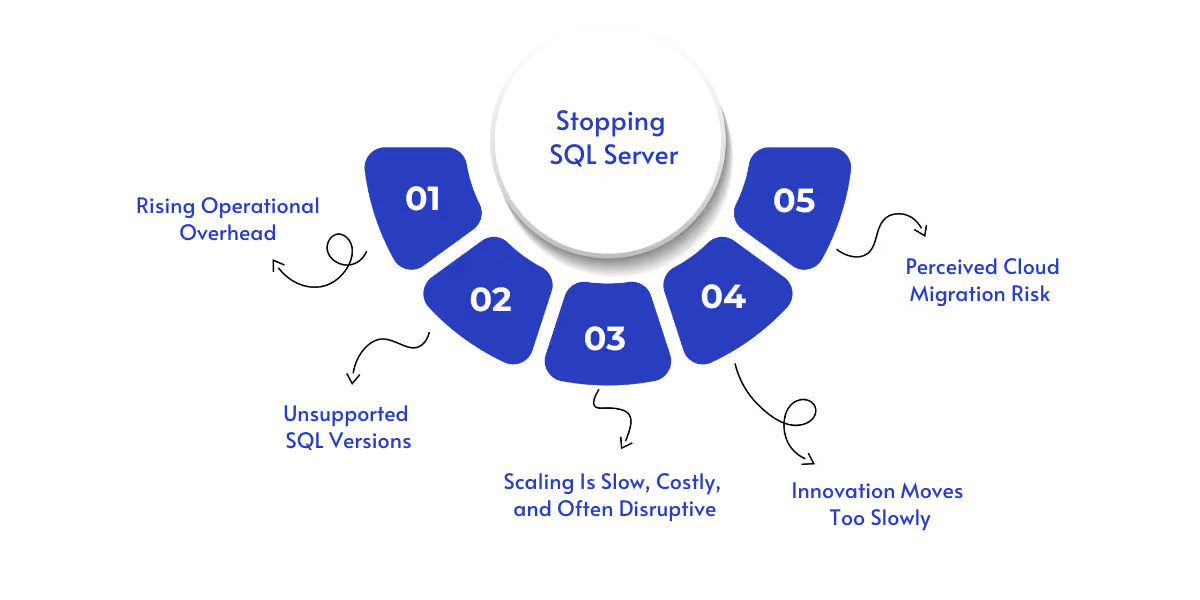
These results point to a clear takeaway: Staying on legacy SQL Server slows business growth and increases risk; modernization is no longer optional.
Here are the core modernization drivers CIOs and database leaders are facing today:
On-prem and VM-hosted SQL environments demand constant upkeep, draining valuable DBA capacity.
How it affects teams:
Key issues:
Legacy versions (SQL 2012, SQL 2008, and older) lack security updates, widening the attack surface.
How it affects the business:
Key issues:
Traditional architectures can’t easily adjust to evolving data workloads.
How it affects performance:
Key issues:
Legacy SQL slows down delivery speed and modern development practices.
How it affects business agility:
Key issues:
Uncertainty becomes a blocker, even when the business case is clear.
How it affects cloud strategy:
Key issues:
These barriers are accelerating the move toward Managed SQL PaaS, the same SQL Server engine, without the operational burden, risk, or performance constraints.
Suggested read: Understanding Microsoft Fabric SQL databases
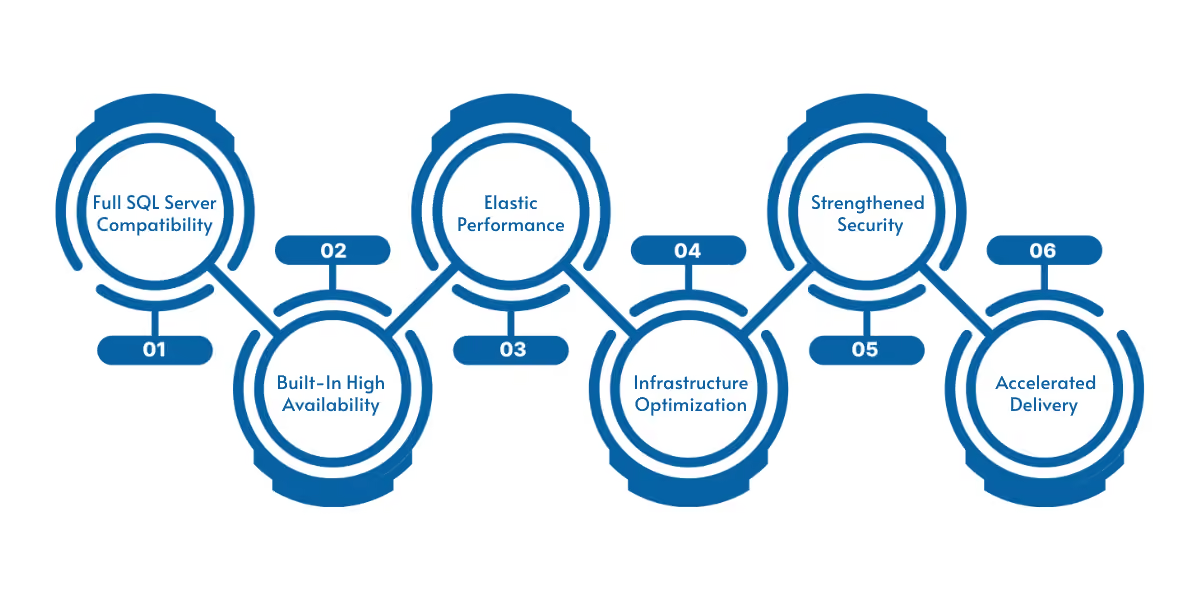
Organizations adopting SQL MI typically see measurable improvements within months, not years.
Below are the modernization benefits that MI delivers immediately after migration:
Result: Infrastructure and maintenance cost immediately drops
Security exposure decreases dramatically post-migration
Azure SQL Managed Instance allows enterprises to modernize SQL workloads with higher performance, stronger security, and significantly lower operational cost, while keeping business-critical applications running without disruption.
Suggested read: A Step-by-Step Guide on Migration Strategies from Azure API for FHIR
Even when the benefits are clear, internal teams often hesitate due to complexity, business risk, and uncertainty in the modernization journey. Azure SQL Managed Instance helps remove many of these blockers up front.
Suggested read: How can you avoid costly outages of your Retail website with Microsoft Power Platform and Microsoft Azure Solutions?
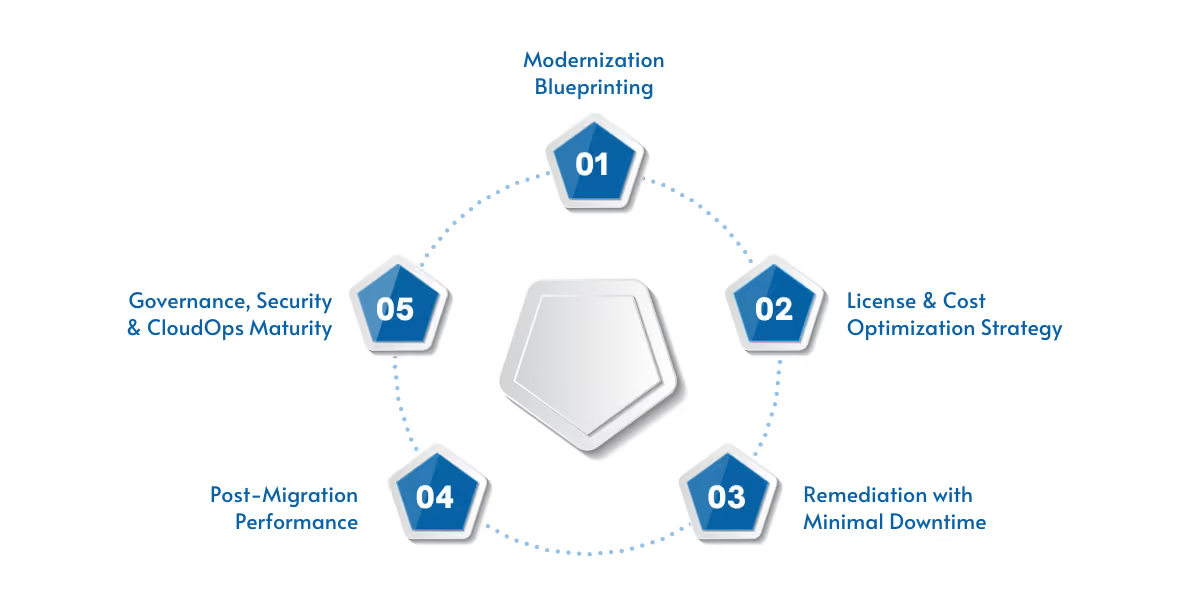
Modernizing SQL workloads isn’t just about moving databases to the cloud; it requires compatibility analysis, secure migration execution, performance tuning, and strong governance from day one. WCT brings a structured, accelerator-driven approach to ensure enterprises reach Azure SQL Managed Instance confidently, without disruption.
Below is the transformation model WCT delivers for customers worldwide:
A full SQL estate assessment powered by automation:
Impact → ~50% faster upfront planning with higher accuracy
Reduce TCO immediately through smart licensing and resource planning:
Outcome → Cost-optimized architecture from day one
WCT ensures migrations are safe, validated, and business-aligned:
Outcome → Business continuity preserved throughout migration
Once live, WCT ensures your SQL environment stays optimized:
Result → Evergreen SQL operations with improved performance resilience
WCT transforms ongoing operations with managed cloud best practices:
Outcome → Predictable operations and reduced admin load
WCT delivers modernization faster with repeatable IPs:
Modernizing with WCT delivers quantifiable improvements in cost, resilience, and operational agility:
A U.S.-based fintech company operated multiple SQL Server 2012/2014 instances powering critical transaction processing systems. Increasing outages, high maintenance overhead, and difficulty scaling placed business growth at risk.
Their challenges:
How WCT helped: Using the SQL Modernization Assessment Engine and MI Migration Booster:
Results delivered:
This is the difference that structured modernization, powered by the right expertise, creates in financial operations.
Suggested read: Azure Cloud Modernization Strategies for the Future
If your SQL workloads are still on-prem or hosted on VMs, now is the time to unlock the agility and operational excellence of Azure SQL Managed Instance, without taking on the risk alone.
WCT helps organizations:
Modernization is simpler when you have a partner who has done it repeatedly. Let’s build your modernization roadmap. Book a consultation with WaferWire today.



Modern transformation demands data platforms that can scale and innovate as fast as the business. Unfortunately, many enterprises are still reliant on aging SQL Server deployments that require constant patching, manual upgrades, and costly server refresh cycles, making it harder to deliver new digital capabilities with speed and confidence.
Migrating SQL Server to Azure SQL Managed Instance changes that equation. With managed availability, optimized performance, lower total cost of ownership, and automated operations, organizations free their teams to focus on modernization, not maintenance.
This guide simplifies the key modernization challenges and explores how Azure SQL MI unlocks modernization outcomes with reduced risk, improved performance, and measurable cost savings.
These results point to a clear takeaway: Staying on legacy SQL Server slows business growth and increases risk; modernization is no longer optional.
Here are the core modernization drivers CIOs and database leaders are facing today:
On-prem and VM-hosted SQL environments demand constant upkeep, draining valuable DBA capacity.
How it affects teams:
Key issues:
Legacy versions (SQL 2012, SQL 2008, and older) lack security updates, widening the attack surface.
How it affects the business:
Key issues:
Traditional architectures can’t easily adjust to evolving data workloads.
How it affects performance:
Key issues:
Legacy SQL slows down delivery speed and modern development practices.
How it affects business agility:
Key issues:
Uncertainty becomes a blocker, even when the business case is clear.
How it affects cloud strategy:
Key issues:
These barriers are accelerating the move toward Managed SQL PaaS, the same SQL Server engine, without the operational burden, risk, or performance constraints.
Suggested read: Understanding Microsoft Fabric SQL databases
Organizations adopting SQL MI typically see measurable improvements within months, not years.
Below are the modernization benefits that MI delivers immediately after migration:
Result: Infrastructure and maintenance cost immediately drops
Security exposure decreases dramatically post-migration
Azure SQL Managed Instance allows enterprises to modernize SQL workloads with higher performance, stronger security, and significantly lower operational cost, while keeping business-critical applications running without disruption.
Suggested read: A Step-by-Step Guide on Migration Strategies from Azure API for FHIR
Even when the benefits are clear, internal teams often hesitate due to complexity, business risk, and uncertainty in the modernization journey. Azure SQL Managed Instance helps remove many of these blockers up front.
Suggested read: How can you avoid costly outages of your Retail website with Microsoft Power Platform and Microsoft Azure Solutions?
Modernizing SQL workloads isn’t just about moving databases to the cloud; it requires compatibility analysis, secure migration execution, performance tuning, and strong governance from day one. WCT brings a structured, accelerator-driven approach to ensure enterprises reach Azure SQL Managed Instance confidently, without disruption.
Below is the transformation model WCT delivers for customers worldwide:
A full SQL estate assessment powered by automation:
Impact → ~50% faster upfront planning with higher accuracy
Reduce TCO immediately through smart licensing and resource planning:
Outcome → Cost-optimized architecture from day one
WCT ensures migrations are safe, validated, and business-aligned:
Outcome → Business continuity preserved throughout migration
Once live, WCT ensures your SQL environment stays optimized:
Result → Evergreen SQL operations with improved performance resilience
WCT transforms ongoing operations with managed cloud best practices:
Outcome → Predictable operations and reduced admin load
WCT delivers modernization faster with repeatable IPs:
Modernizing with WCT delivers quantifiable improvements in cost, resilience, and operational agility:
A U.S.-based fintech company operated multiple SQL Server 2012/2014 instances powering critical transaction processing systems. Increasing outages, high maintenance overhead, and difficulty scaling placed business growth at risk.
Their challenges:
How WCT helped: Using the SQL Modernization Assessment Engine and MI Migration Booster:
Results delivered:
This is the difference that structured modernization, powered by the right expertise, creates in financial operations.
Suggested read: Azure Cloud Modernization Strategies for the Future
If your SQL workloads are still on-prem or hosted on VMs, now is the time to unlock the agility and operational excellence of Azure SQL Managed Instance, without taking on the risk alone.
WCT helps organizations:
Modernization is simpler when you have a partner who has done it repeatedly. Let’s build your modernization roadmap. Book a consultation with WaferWire today.
1. How do I know if my SQL Server workloads are ready for Azure SQL Managed Instance?
If you’re managing outdated SQL versions, facing high licensing or hardware costs, or struggling with performance and availability, modernization should be considered. A readiness assessment from WCT evaluates compatibility, sizing, and migration complexity.
2. Will migrating to Azure SQL MI cause downtime or data loss?
No, WCT uses Azure Database Migration Service with phased cutovers, continuous sync, and validation to ensure a controlled, near-zero-downtime transition.
3. Do we need to refactor applications when moving to Azure SQL MI?
In most cases, no. Azure SQL MI maintains high SQL Server compatibility including SQL Agent, cross-database queries, and linked servers, minimizing code changes and reducing migration risk.
4. How quickly can we reduce costs after modernization?
Cost benefits begin immediately by eliminating hardware maintenance, and up to 55% savings can be achieved through Azure Hybrid Benefit, right-sizing, and automated cloud optimization.



.svg)
