





Thank you! Your submission has been received!
Oops! Something went wrong while submitting the form.



Microsoft Fabric offers a unified platform for data engineering, data science, and business intelligence, enabling organizations to develop robust data solutions. To truly maximize efficiency and agility within this environment, implementing Continuous Integration and Continuous Delivery (CI/CD) is crucial. This guide will explore how CI/CD can transform your Microsoft Fabric development and deployment processes.
At its core, CI/CD is a set of practices designed to automate the process of building, testing, and deploying software or, in the context of Microsoft Fabric, data solutions.
In the context of Microsoft Fabric, CI/CD applies to various components, including data pipelines, Power BI reports, semantic models, and other Fabric artifacts.
Understanding the fundamental principles of CI/CD lays the groundwork for appreciating its significant impact on operational efficiency and effectiveness.
Manual deployment processes are often time-consuming, error-prone, and can become bottlenecks in delivering valuable insights. Automating these processes through CI/CD offers significant advantages:
The compelling benefits of automation naturally lead us to explore the key components that enable CI/CD within Microsoft Fabric.
CI/CD inherently promotes collaboration within data teams. By ensuring frequent integration and deployment of changes, team members stay aligned and have a clear view of the evolving data landscape. This fosters better communication and reduces integration conflicts.
With a clear understanding of the collaborative advantages, let's now examine the essential building blocks of CI/CD in the Microsoft Fabric environment.
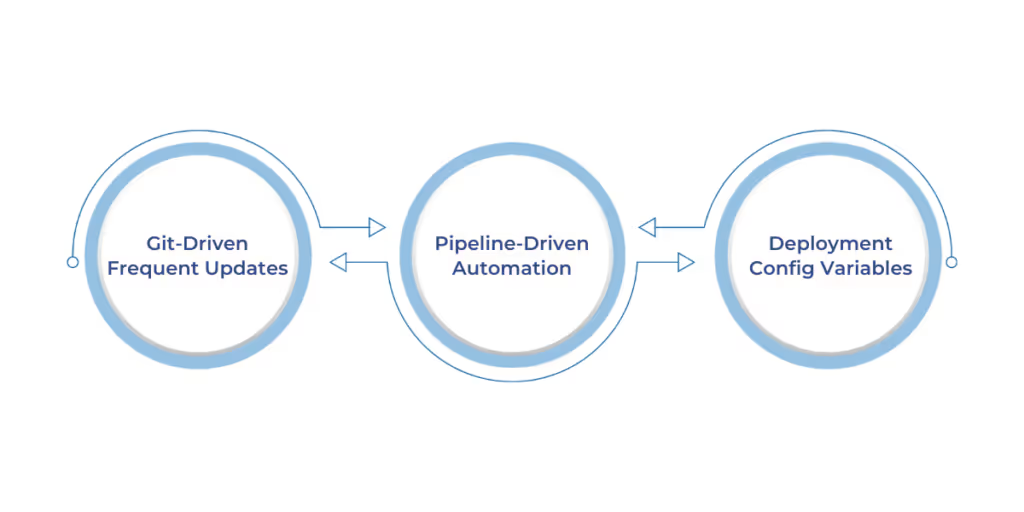
Microsoft Fabric provides several key components that facilitate the implementation of robust CI/CD pipelines:
Having identified the core components, we proceed to outline the practical steps involved in implementing a CI/CD pipeline within Microsoft Fabric.
Implementing a CI/CD pipeline in Microsoft Fabric involves a structured approach:
1. Step 1: Git Integration - Setup and Configuration
2. Step 2: Connecting Workspaces with Git
3. Step 3: Create and Manage Deployment Pipelines
4. Step 4: Automate Deployment through APIs
With the implementation steps clarified, it is essential to understand how these pipelines integrate into the overall development and release lifecycle.
A well-defined development and release process is crucial for successful CI/CD implementation:
Developers and data engineers can work on different features or components in isolated development workspaces, making changes and committing them to their respective branches in the Git repository.
Once a feature is complete and tested locally, the changes are merged into the main branch through a pull request process (discussed later). This merge can then trigger the automated CI/CD pipeline to build, test, and deploy the changes to the subsequent environments (Test, Production).
To ensure the effectiveness and stability of your CI/CD pipelines, adopting certain best practices is highly recommended.
To maximize the benefits of CI/CD in Microsoft Fabric, consider these best practices:
Understanding these best practices sets the stage for exploring the various standard workflow options available for CI/CD in Microsoft Fabric.
There are several ways to implement CI/CD with Microsoft Fabric, each with its advantages:
To illustrate the practical value of these CI/CD workflows, let's consider some real-world applications across different industries.
The benefits of CI/CD in Microsoft Fabric are tangible across various industries:
A retail company utilizes Fabric to analyze sales data. With CI/CD, they can automate the deployment of new data pipelines to ingest and process real-time sales data, ensuring timely insights for inventory management and marketing campaigns. Azure DevOps can be used to orchestrate the build and release process based on changes in its Fabric Git repository.
A healthcare organization uses Fabric to build reports and dashboards for patient data analysis. CI/CD enables them to rapidly deploy updates to these reports based on evolving clinical guidelines and data sources, ensuring healthcare professionals have access to the latest information for improved patient care. Fabric Deployment Pipelines can manage the flow of report updates from development to production environments.
A marketing team uses Fabric to analyze campaign performance. By integrating their Fabric workspace with Azure DevOps and setting up CI/CD pipelines, they can automate the deployment of new analytical models and dashboards whenever changes are made to their underlying data transformations or Power BI reports. This allows for faster iteration and optimization of marketing strategies.
These examples underscore the transformative impact of CI/CD, leading us to consider its overall significance and future trajectory within the Microsoft Fabric ecosystem.
What was once considered an advanced technique, implementing CI/CD in Microsoft Fabric, is now an essential foundation for organizations aiming to optimize their data workflows, foster seamless collaboration, and accelerate the time-to-value of their data insights. By embracing automation and best practices, you can transform your data journey, ensuring efficiency, reducing errors, and ultimately driving sustainable growth.
Ready to access the full potential of Microsoft Fabric with streamlined and automated data processes? Contact WaferWire today to learn how our expert team can help you design and implement a robust CI/CD strategy tailored to your unique needs.




Microsoft Fabric offers a unified platform for data engineering, data science, and business intelligence, enabling organizations to develop robust data solutions. To truly maximize efficiency and agility within this environment, implementing Continuous Integration and Continuous Delivery (CI/CD) is crucial. This guide will explore how CI/CD can transform your Microsoft Fabric development and deployment processes.
At its core, CI/CD is a set of practices designed to automate the process of building, testing, and deploying software or, in the context of Microsoft Fabric, data solutions.
In the context of Microsoft Fabric, CI/CD applies to various components, including data pipelines, Power BI reports, semantic models, and other Fabric artifacts.
Understanding the fundamental principles of CI/CD lays the groundwork for appreciating its significant impact on operational efficiency and effectiveness.
Manual deployment processes are often time-consuming, error-prone, and can become bottlenecks in delivering valuable insights. Automating these processes through CI/CD offers significant advantages:
The compelling benefits of automation naturally lead us to explore the key components that enable CI/CD within Microsoft Fabric.
CI/CD inherently promotes collaboration within data teams. By ensuring frequent integration and deployment of changes, team members stay aligned and have a clear view of the evolving data landscape. This fosters better communication and reduces integration conflicts.
With a clear understanding of the collaborative advantages, let's now examine the essential building blocks of CI/CD in the Microsoft Fabric environment.
Microsoft Fabric provides several key components that facilitate the implementation of robust CI/CD pipelines:
Having identified the core components, we proceed to outline the practical steps involved in implementing a CI/CD pipeline within Microsoft Fabric.
Implementing a CI/CD pipeline in Microsoft Fabric involves a structured approach:
1. Step 1: Git Integration - Setup and Configuration
2. Step 2: Connecting Workspaces with Git
3. Step 3: Create and Manage Deployment Pipelines
4. Step 4: Automate Deployment through APIs
With the implementation steps clarified, it is essential to understand how these pipelines integrate into the overall development and release lifecycle.
A well-defined development and release process is crucial for successful CI/CD implementation:
Developers and data engineers can work on different features or components in isolated development workspaces, making changes and committing them to their respective branches in the Git repository.
Once a feature is complete and tested locally, the changes are merged into the main branch through a pull request process (discussed later). This merge can then trigger the automated CI/CD pipeline to build, test, and deploy the changes to the subsequent environments (Test, Production).
To ensure the effectiveness and stability of your CI/CD pipelines, adopting certain best practices is highly recommended.
To maximize the benefits of CI/CD in Microsoft Fabric, consider these best practices:
Understanding these best practices sets the stage for exploring the various standard workflow options available for CI/CD in Microsoft Fabric.
There are several ways to implement CI/CD with Microsoft Fabric, each with its advantages:
To illustrate the practical value of these CI/CD workflows, let's consider some real-world applications across different industries.
The benefits of CI/CD in Microsoft Fabric are tangible across various industries:
A retail company utilizes Fabric to analyze sales data. With CI/CD, they can automate the deployment of new data pipelines to ingest and process real-time sales data, ensuring timely insights for inventory management and marketing campaigns. Azure DevOps can be used to orchestrate the build and release process based on changes in its Fabric Git repository.
A healthcare organization uses Fabric to build reports and dashboards for patient data analysis. CI/CD enables them to rapidly deploy updates to these reports based on evolving clinical guidelines and data sources, ensuring healthcare professionals have access to the latest information for improved patient care. Fabric Deployment Pipelines can manage the flow of report updates from development to production environments.
A marketing team uses Fabric to analyze campaign performance. By integrating their Fabric workspace with Azure DevOps and setting up CI/CD pipelines, they can automate the deployment of new analytical models and dashboards whenever changes are made to their underlying data transformations or Power BI reports. This allows for faster iteration and optimization of marketing strategies.
These examples underscore the transformative impact of CI/CD, leading us to consider its overall significance and future trajectory within the Microsoft Fabric ecosystem.
What was once considered an advanced technique, implementing CI/CD in Microsoft Fabric, is now an essential foundation for organizations aiming to optimize their data workflows, foster seamless collaboration, and accelerate the time-to-value of their data insights. By embracing automation and best practices, you can transform your data journey, ensuring efficiency, reducing errors, and ultimately driving sustainable growth.
Ready to access the full potential of Microsoft Fabric with streamlined and automated data processes? Contact WaferWire today to learn how our expert team can help you design and implement a robust CI/CD strategy tailored to your unique needs.






.svg)
