




Thank you! Your submission has been received!
Oops! Something went wrong while submitting the form.



Producing accurate, compliant reports is essential for modern business operations, whether you’re handling tax filings, financial summaries, or customer invoices. Microsoft Dynamics 365 Electronic Reporting (ER) makes this easier by letting you create electronic documents without coding.
If you’re a business analyst, IT professional, or functional consultant, mastering ER can transform how you manage reporting tasks, saving time and boosting efficiency. This guide will explain the essentials of Dynamics 365 Electronic Reporting, including its core components and practical applications.
Dynamics 365 Electronic Reporting is a versatile tool within Microsoft’s ERP and CRM platform, designed to simplify the creation of electronic documents like invoices, financial reports, or regulatory submissions. Gone are the days when custom X++ coding was the only way to build reports, requiring deep technical skills. ER offers a visual interface that lets you design and tweak reports quickly, even if you’re not a developer.
The best part is that because ER is cloud-based, it scales with your business. You can generate reports at any time without worrying about losing quality or accuracy. As your business grows, ER grows with it. It reduces the time you’d spend on manual processes and ensures that your reports meet all regulatory requirements.
Let’s explore the components that make up Dynamics 365 ER and how they help you streamline your reporting process.
For more information, read the official Microsoft documentation on Electronic Reporting (ER).
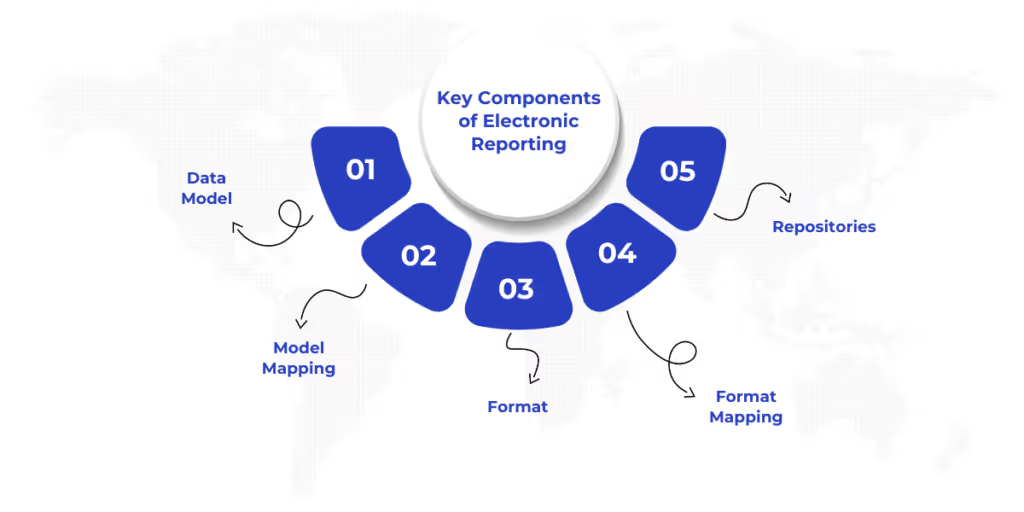
You need to understand the core components of Dynamics 365 Electronic Reporting to get the most out of it. These elements work in tandem to pull data from your system and shape it into polished reports. Here’s what you’ll work with:
These components form the backbone of Dynamics 365 Electronic Reporting, enabling you to build flexible, accurate reports. Now that you know the basics, let’s talk about how you can configure your reports.
Setting up Dynamics 365 Electronic Reporting in your environment is the first step to creating reports. Proper configuration ensures your system is ready for smooth report development. Here’s how to get started:
With these steps, your Dynamics 365 environment is ready for creating and managing electronic reports. Let’s explore the process of generating your first electronic report in Dynamics 365.
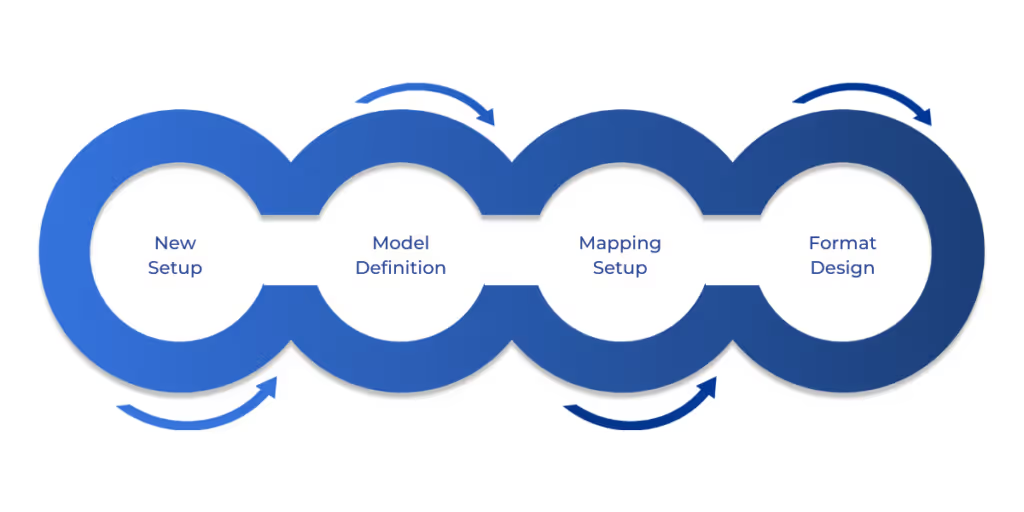
Building a report in Dynamics 365 Electronic Reporting brings your configurations to life. Whether you’re creating an invoice or a tax document, the process is straightforward with the right steps. Here’s how to do it:
This process, supported by ER’s visual tools, lets you create professional, accurate reports tailored to your needs. Now that you know how to create reports, let’s discuss the reporting configuration process to make sure your reports stay effective.
After creating a report, refining and managing its configuration ensures it remains effective. This iterative process keeps your reports aligned with business and regulatory needs. Here’s how to manage it:
This structured approach keeps your Dynamics 365 Electronic Reporting configurations reliable and up to date. Now that you have your reports configured and refined, let’s move on to managing your ER architecture to keep everything running smoothly.
A well-maintained ER architecture ensures your Dynamics 365 Electronic Reporting setup scales with your business. This involves organizing repositories, versions, security, and integrations. Here’s how to manage it:
Effective architecture management keeps your reporting system organized and scalable. Now, let’s look at the practical applications of Dynamics 365 ER and how to manage your outputs effectively.
Dynamics 365 Electronic Reporting excels in real-world scenarios, making complex reporting tasks easier. Here’s how to apply it and manage outputs effectively:
These applications and output strategies make Dynamics 365 Electronic Reporting a game-changer for efficiency and compliance.
Mastering Dynamics 365 Electronic Reporting empowers you to handle reporting challenges with ease, from tax filings to customer documents. By understanding its components, configuring the tool, and managing outputs, you can streamline processes and stay compliant.
WaferWire’s deep expertise in Dynamics 365 takes this to the next level. Our global team offers tailored solutions, from custom configurations to ongoing support, ensuring your ER setup drives maximum value. Ready to simplify your reporting? Explore WaferWire’s Microsoft Solutions and connect with our experts today.
1. Do I need to know coding to use Dynamics 365 Electronic Reporting?
No, one of the key benefits of Dynamics 365 Electronic Reporting is that it requires no coding knowledge. The tool uses a visual designer and configuration-based approach, allowing business users and functional consultants to create, map, and format reports without writing X++ or custom code.
2. What types of reports can I generate with Dynamics 365 ER?
You can create a wide range of electronic documents, including:
Tax reports (e.g., VAT, GST filings)
Customer-facing documents (e.g., invoices, delivery notes)
Regulatory submissions
Internal financial summaries
Custom exports in Excel, XML, PDF, or other formats
3. Can I reuse or customize existing ER configurations?
Yes. Dynamics 365 ER allows you to import base configurations from Microsoft’s Global repository and customize them to meet your specific business requirements. This saves time and ensures compliance with regional standards.
4. How do I ensure data accuracy in my reports?
Data accuracy is achieved by:
Creating a robust data model
Carefully mapping data fields to the correct sources in Dynamics 365
Testing configurations before deployment using sample data and the ER log
5. What are repositories and why are they important?
Repositories are storage locations for your ER configurations. Common types include:
Local folders (for development)
SharePoint (for collaboration)
Lifecycle Services (LCS) (for production environments)
They help you organize, share, and deploy configurations across environments efficiently.




Producing accurate, compliant reports is essential for modern business operations, whether you’re handling tax filings, financial summaries, or customer invoices. Microsoft Dynamics 365 Electronic Reporting (ER) makes this easier by letting you create electronic documents without coding.
If you’re a business analyst, IT professional, or functional consultant, mastering ER can transform how you manage reporting tasks, saving time and boosting efficiency. This guide will explain the essentials of Dynamics 365 Electronic Reporting, including its core components and practical applications.
Dynamics 365 Electronic Reporting is a versatile tool within Microsoft’s ERP and CRM platform, designed to simplify the creation of electronic documents like invoices, financial reports, or regulatory submissions. Gone are the days when custom X++ coding was the only way to build reports, requiring deep technical skills. ER offers a visual interface that lets you design and tweak reports quickly, even if you’re not a developer.
The best part is that because ER is cloud-based, it scales with your business. You can generate reports at any time without worrying about losing quality or accuracy. As your business grows, ER grows with it. It reduces the time you’d spend on manual processes and ensures that your reports meet all regulatory requirements.
Let’s explore the components that make up Dynamics 365 ER and how they help you streamline your reporting process.
For more information, read the official Microsoft documentation on Electronic Reporting (ER).
You need to understand the core components of Dynamics 365 Electronic Reporting to get the most out of it. These elements work in tandem to pull data from your system and shape it into polished reports. Here’s what you’ll work with:
These components form the backbone of Dynamics 365 Electronic Reporting, enabling you to build flexible, accurate reports. Now that you know the basics, let’s talk about how you can configure your reports.
Setting up Dynamics 365 Electronic Reporting in your environment is the first step to creating reports. Proper configuration ensures your system is ready for smooth report development. Here’s how to get started:
With these steps, your Dynamics 365 environment is ready for creating and managing electronic reports. Let’s explore the process of generating your first electronic report in Dynamics 365.
Building a report in Dynamics 365 Electronic Reporting brings your configurations to life. Whether you’re creating an invoice or a tax document, the process is straightforward with the right steps. Here’s how to do it:
This process, supported by ER’s visual tools, lets you create professional, accurate reports tailored to your needs. Now that you know how to create reports, let’s discuss the reporting configuration process to make sure your reports stay effective.
After creating a report, refining and managing its configuration ensures it remains effective. This iterative process keeps your reports aligned with business and regulatory needs. Here’s how to manage it:
This structured approach keeps your Dynamics 365 Electronic Reporting configurations reliable and up to date. Now that you have your reports configured and refined, let’s move on to managing your ER architecture to keep everything running smoothly.
A well-maintained ER architecture ensures your Dynamics 365 Electronic Reporting setup scales with your business. This involves organizing repositories, versions, security, and integrations. Here’s how to manage it:
Effective architecture management keeps your reporting system organized and scalable. Now, let’s look at the practical applications of Dynamics 365 ER and how to manage your outputs effectively.
Dynamics 365 Electronic Reporting excels in real-world scenarios, making complex reporting tasks easier. Here’s how to apply it and manage outputs effectively:
These applications and output strategies make Dynamics 365 Electronic Reporting a game-changer for efficiency and compliance.
Mastering Dynamics 365 Electronic Reporting empowers you to handle reporting challenges with ease, from tax filings to customer documents. By understanding its components, configuring the tool, and managing outputs, you can streamline processes and stay compliant.
WaferWire’s deep expertise in Dynamics 365 takes this to the next level. Our global team offers tailored solutions, from custom configurations to ongoing support, ensuring your ER setup drives maximum value. Ready to simplify your reporting? Explore WaferWire’s Microsoft Solutions and connect with our experts today.
1. Do I need to know coding to use Dynamics 365 Electronic Reporting?
No, one of the key benefits of Dynamics 365 Electronic Reporting is that it requires no coding knowledge. The tool uses a visual designer and configuration-based approach, allowing business users and functional consultants to create, map, and format reports without writing X++ or custom code.
2. What types of reports can I generate with Dynamics 365 ER?
You can create a wide range of electronic documents, including:
Tax reports (e.g., VAT, GST filings)
Customer-facing documents (e.g., invoices, delivery notes)
Regulatory submissions
Internal financial summaries
Custom exports in Excel, XML, PDF, or other formats
3. Can I reuse or customize existing ER configurations?
Yes. Dynamics 365 ER allows you to import base configurations from Microsoft’s Global repository and customize them to meet your specific business requirements. This saves time and ensures compliance with regional standards.
4. How do I ensure data accuracy in my reports?
Data accuracy is achieved by:
Creating a robust data model
Carefully mapping data fields to the correct sources in Dynamics 365
Testing configurations before deployment using sample data and the ER log
5. What are repositories and why are they important?
Repositories are storage locations for your ER configurations. Common types include:
Local folders (for development)
SharePoint (for collaboration)
Lifecycle Services (LCS) (for production environments)
They help you organize, share, and deploy configurations across environments efficiently.





.svg)
