



Thank you! Your submission has been received!
Oops! Something went wrong while submitting the form.


Customer expectations are higher than ever, and delivering excellent service is no longer optional. According to a study by Bain & Company, customers facing service issues are four times more likely to switch to a competitor. Supporting this, research by Qualtrics and ServiceNow shows that 80% of customers have switched brands due to poor experiences. Ensuring timely and consistent support within such competition can make all the difference in keeping customer loyalty.
This is where Service Level Agreements (SLAs) come into play. Within Dynamics 365 Customer Service, SLAs serve as clear commitments between your business and your customers, defining how quickly cases should be addressed and resolved. By automating SLA tracking, sending alerts for potential breaches, and generating detailed performance reports, Dynamics 365 empowers your team to deliver on these promises consistently.
In this blog, we will explore the vital role SLAs play in Dynamics 365 Customer Service, break down their core components, and guide you in configuring and monitoring them to boost customer satisfaction and operational efficiency.
Service Level Agreements (SLAs) in Dynamics 365 are formal contracts that define the expected standard of service between a service provider and their customers. Essentially, an SLA sets clear expectations by specifying the minimum response times and resolution periods for issues once they are reported. This agreement helps ensure transparency, both for the customer and the service team, about when a case should be addressed and resolved.
SLAs play a crucial role in maintaining consistency in service delivery. By enforcing agreed-upon timelines, they help service organizations measure their performance and keep customers informed about the progress of their requests.
For example, different customer tiers may have varying SLA levels: a VIP customer might require a response within one hour and resolution within four hours, while a standard customer could have a response time of four hours and resolution within 24 hours. This tiered approach allows businesses to prioritize resources effectively and align service quality with customer value.
By incorporating SLAs in Dynamics 365, companies can automate tracking, send timely alerts for potential breaches, and generate performance reports, all of which contribute to delivering reliable and transparent customer service.
Now that we know what SLAs are and why they matter, let’s dive into the core components that power SLAs in Dynamics 365 Customer Service.
SLAs in Dynamics 365 function through a combination of SLA KPIs (Key Performance Indicators), SLA items, and SLA KPIs’ applicable conditions. These components work together to ensure consistent and efficient service delivery. Below is an in-depth exploration of each core element:
By understanding and effectively configuring these core components, organizations can leverage SLAs in Dynamics 365 Customer Service to enhance operational efficiency, meet customer expectations, and drive continuous improvement in service delivery.
With these components in place, understanding how SLAs operate day-to-day within Dynamics 365 is key to enforcing service quality.
Understanding the operational flow of SLAs in Dynamics 365 Customer Service is essential for enforcing service commitments and improving customer satisfaction. Here’s a step-by-step overview of how SLAs function within the system:
Also read: How can you upgrade from Dynamics AX 2012 to MS Dynamics 365?
Having seen how SLAs actively manage your service commitments, let’s dive into the specific features you can configure to customize SLAs for your unique business needs.
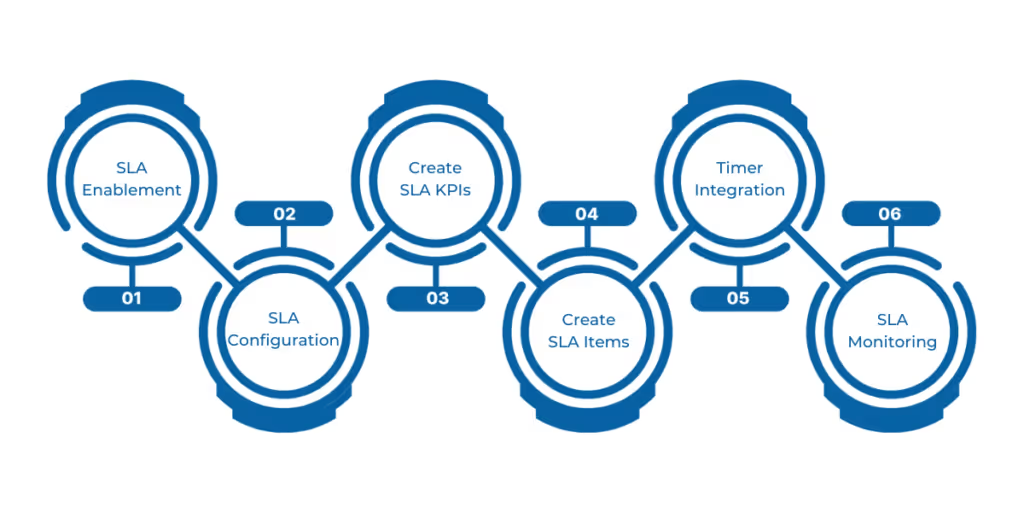
Service Level Agreements (SLAs) and Key Performance Indicators (KPIs) are essential for ensuring timely and efficient customer service in Microsoft Dynamics 365. Here's a structured guide to setting them up:
Before configuring SLAs, ensure that the relevant entities are enabled for SLA tracking:
Note: SLAs can be enabled for a maximum of seven entities. It's recommended to have no more than five SLA KPIs per entity and fewer than 15 SLA items per entity.
Also check out: Microsoft Dynamics 365- Your steering to drive customer engagement success.
Proper holidays and working hours scheduling ensure SLA timers reflect your organization’s actual service availability.
Managing holidays and service schedules is crucial for accurate SLA tracking and ensuring realistic service commitments. Dynamics 365 Customer Service offers robust features to define business hours and holidays, allowing SLAs to pause during non-working periods, which helps prevent unfair SLA breaches.
A holiday schedule defines specific dates when your organization is closed, ensuring that SLA timers pause during these periods.
Steps to Create a Holiday Schedule:
By associating this holiday schedule with your customer service schedule, SLA timers will pause during these defined holidays.
A customer service schedule defines your organization's working hours and weekly off days, which are used to calculate SLA timers.
Steps to Create a Customer Service Schedule:
By associating this customer service schedule with your SLAs, you ensure that SLA timers respect your organization's working hours and holidays.
Finally, continuous monitoring of SLA performance helps keep service delivery on track and drives ongoing improvements.
Dynamics 365 provides several tools to help service managers track SLA adherence:
When your customers rely on you, meeting your service commitments is essential. SLAs in Dynamics 365 Customer Service give you the tools to keep those promises visible and manageable. But having the right tools isn’t enough, and you need experienced partners who understand the challenges and can help you implement and maintain SLAs that actually work for your business.
That’s where WaferWire steps in. With deep expertise and hands-on support, we help you stay on top of your service goals, avoid costly mistakes, and build stronger relationships with your customers.
Why Choose WaferWire?
Ready to make your service levels more than just words? Reach out to WaferWire and let’s get started.




Customer expectations are higher than ever, and delivering excellent service is no longer optional. According to a study by Bain & Company, customers facing service issues are four times more likely to switch to a competitor. Supporting this, research by Qualtrics and ServiceNow shows that 80% of customers have switched brands due to poor experiences. Ensuring timely and consistent support within such competition can make all the difference in keeping customer loyalty.
This is where Service Level Agreements (SLAs) come into play. Within Dynamics 365 Customer Service, SLAs serve as clear commitments between your business and your customers, defining how quickly cases should be addressed and resolved. By automating SLA tracking, sending alerts for potential breaches, and generating detailed performance reports, Dynamics 365 empowers your team to deliver on these promises consistently.
In this blog, we will explore the vital role SLAs play in Dynamics 365 Customer Service, break down their core components, and guide you in configuring and monitoring them to boost customer satisfaction and operational efficiency.
Service Level Agreements (SLAs) in Dynamics 365 are formal contracts that define the expected standard of service between a service provider and their customers. Essentially, an SLA sets clear expectations by specifying the minimum response times and resolution periods for issues once they are reported. This agreement helps ensure transparency, both for the customer and the service team, about when a case should be addressed and resolved.
SLAs play a crucial role in maintaining consistency in service delivery. By enforcing agreed-upon timelines, they help service organizations measure their performance and keep customers informed about the progress of their requests.
For example, different customer tiers may have varying SLA levels: a VIP customer might require a response within one hour and resolution within four hours, while a standard customer could have a response time of four hours and resolution within 24 hours. This tiered approach allows businesses to prioritize resources effectively and align service quality with customer value.
By incorporating SLAs in Dynamics 365, companies can automate tracking, send timely alerts for potential breaches, and generate performance reports, all of which contribute to delivering reliable and transparent customer service.
Now that we know what SLAs are and why they matter, let’s dive into the core components that power SLAs in Dynamics 365 Customer Service.
SLAs in Dynamics 365 function through a combination of SLA KPIs (Key Performance Indicators), SLA items, and SLA KPIs’ applicable conditions. These components work together to ensure consistent and efficient service delivery. Below is an in-depth exploration of each core element:
By understanding and effectively configuring these core components, organizations can leverage SLAs in Dynamics 365 Customer Service to enhance operational efficiency, meet customer expectations, and drive continuous improvement in service delivery.
With these components in place, understanding how SLAs operate day-to-day within Dynamics 365 is key to enforcing service quality.
Understanding the operational flow of SLAs in Dynamics 365 Customer Service is essential for enforcing service commitments and improving customer satisfaction. Here’s a step-by-step overview of how SLAs function within the system:
Also read: How can you upgrade from Dynamics AX 2012 to MS Dynamics 365?
Having seen how SLAs actively manage your service commitments, let’s dive into the specific features you can configure to customize SLAs for your unique business needs.
Service Level Agreements (SLAs) and Key Performance Indicators (KPIs) are essential for ensuring timely and efficient customer service in Microsoft Dynamics 365. Here's a structured guide to setting them up:
Before configuring SLAs, ensure that the relevant entities are enabled for SLA tracking:
Note: SLAs can be enabled for a maximum of seven entities. It's recommended to have no more than five SLA KPIs per entity and fewer than 15 SLA items per entity.
Also check out: Microsoft Dynamics 365- Your steering to drive customer engagement success.
Proper holidays and working hours scheduling ensure SLA timers reflect your organization’s actual service availability.
Managing holidays and service schedules is crucial for accurate SLA tracking and ensuring realistic service commitments. Dynamics 365 Customer Service offers robust features to define business hours and holidays, allowing SLAs to pause during non-working periods, which helps prevent unfair SLA breaches.
A holiday schedule defines specific dates when your organization is closed, ensuring that SLA timers pause during these periods.
Steps to Create a Holiday Schedule:
By associating this holiday schedule with your customer service schedule, SLA timers will pause during these defined holidays.
A customer service schedule defines your organization's working hours and weekly off days, which are used to calculate SLA timers.
Steps to Create a Customer Service Schedule:
By associating this customer service schedule with your SLAs, you ensure that SLA timers respect your organization's working hours and holidays.
Finally, continuous monitoring of SLA performance helps keep service delivery on track and drives ongoing improvements.
Dynamics 365 provides several tools to help service managers track SLA adherence:
When your customers rely on you, meeting your service commitments is essential. SLAs in Dynamics 365 Customer Service give you the tools to keep those promises visible and manageable. But having the right tools isn’t enough, and you need experienced partners who understand the challenges and can help you implement and maintain SLAs that actually work for your business.
That’s where WaferWire steps in. With deep expertise and hands-on support, we help you stay on top of your service goals, avoid costly mistakes, and build stronger relationships with your customers.
Why Choose WaferWire?
Ready to make your service levels more than just words? Reach out to WaferWire and let’s get started.




.svg)
